


Dylan
whats-new-performance-improvement-rocket Product Update
by  Dylan Connerton
New Navigation

Finding your way through Forecast should be simple and intuitive. As we add new features to the platform, the navigation needs to evolve to support greater functionality. 

As a result, we’ve revisited our entire navigation experience, leveraging extensive research and testing to develop a simpler way to get what you need - and we’re excited to share it with you!

2023-05-09 00:00:00
calen cole
whats-new-performance-improvement-rocket Product Update
by  Calen Cole
See which exported invoices have been paid
Exported Invoices
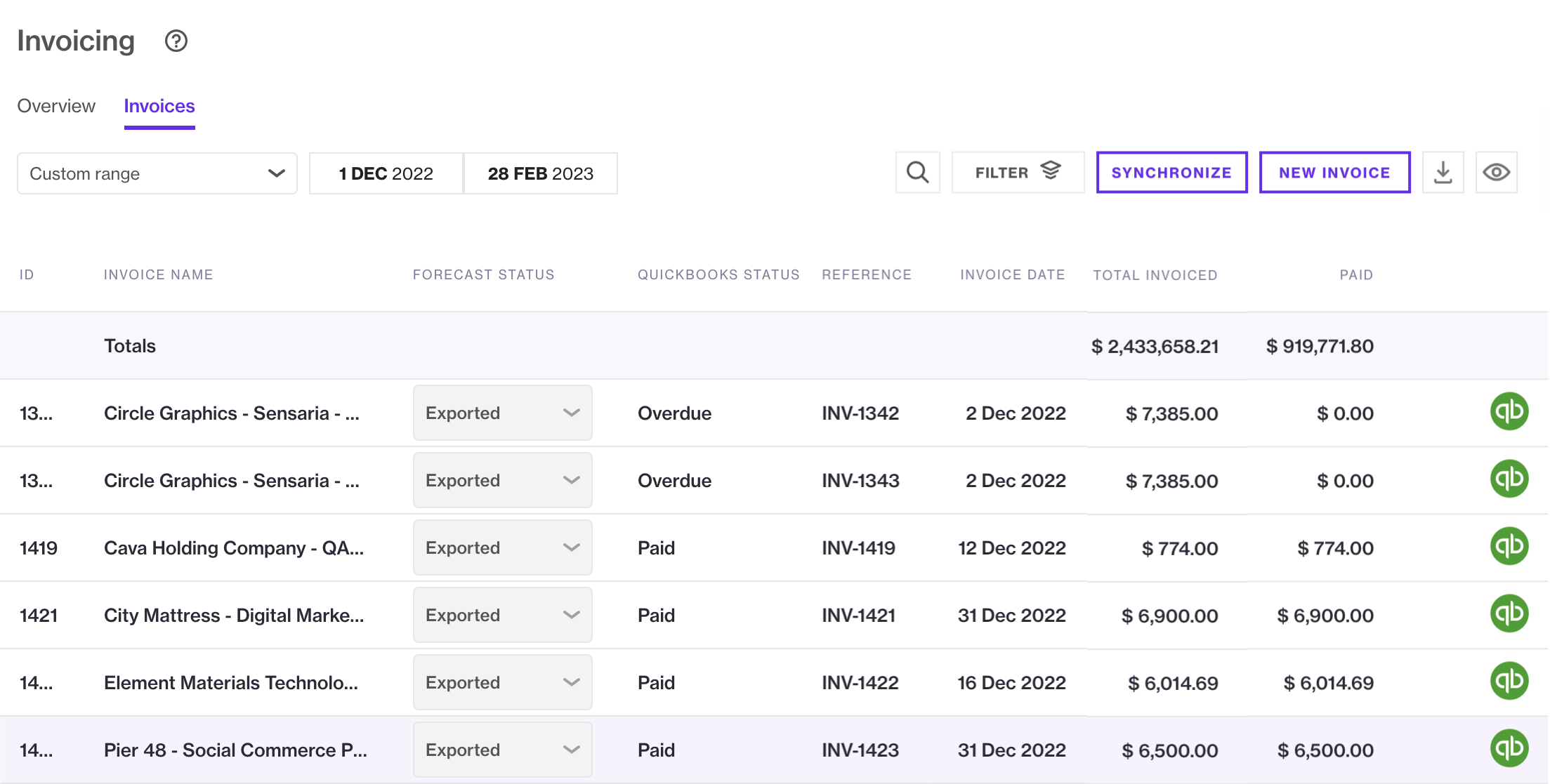
A key benefit of integrating Forecast with financial software is increased visibility between project delivery and finance departments. Building on this strength, account, project and finance managers using accounting integrations, such as QuickBooks Online, can now easily see if their projects have unpaid, paid or overdue invoices. This means you longer have to spend time contacting the finance department to ensure there aren’t any overdue invoices. 

Get your existing invoices up to date by clicking the 'Synchronize' button on the top right of your screen. If you’re using saved filters, you can leverage the new 'Exported' status to filter for invoices which have been synced to your integrated accounting platform and see which haven’t been paid yet.
2023-02-23 00:00:00
calen cole
whats-new-performance-improvement-rocket Product Update
by  Calen Cole
See this year’s invoices with a single click
Date Selecter
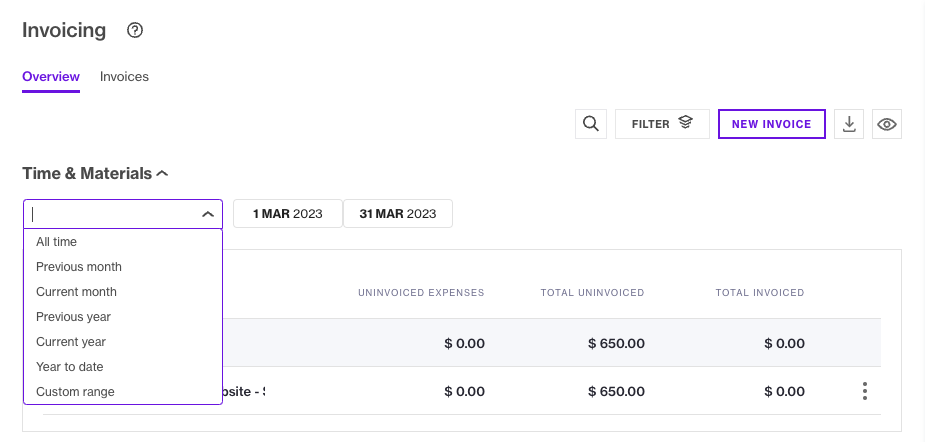
Change the project invoicing overview for your Time & Materials by choosing between common date ranges: all time, previous month, current month, previous year, current year and year to date. The selected date range will remain when you leave and return to the page, so you don’t have to re-select it. 
2023-02-21 00:00:00
nicole_vp_marketing
feature Referral
by  Nicole Lindenbaum
Refer a friend and receive a $200 Amazon gift card

Know someone who could benefit from using Forecast?

If your referral meets the qualification criteria and attends a demonstration with our team, you will receive a $200 Amazon Gift Card. It’s that easy!

2023-02-22 00:00:00
Anders Dehn
whats-new-performance-improvement-rocket New Feature
by  Anders Dehn
Pinpoint exactly what you need with more powerful filters
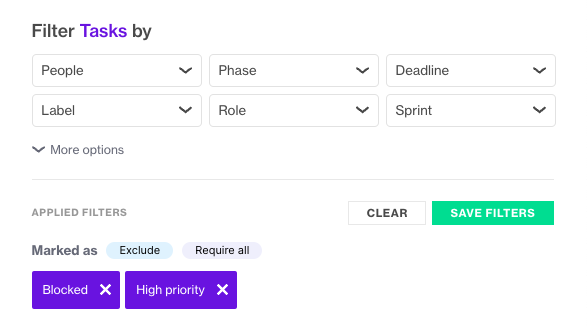
Image of Updated Filters
Do you need to find all developer tasks that are due next week, but exclude the ones that are labeled both “Blocked” and “Priority_high”? Now you can by using the Require all or Exclude options for each filter category! 

Your most used filters are at the top of each category, making them easier to find. The updated filters can be found on all pages, except reports. 
2023-02-16 00:00:00
calen cole
whats-new-performance-improvement-rocket Product Update
by  Calen Cole
A smoother BambooHR user import
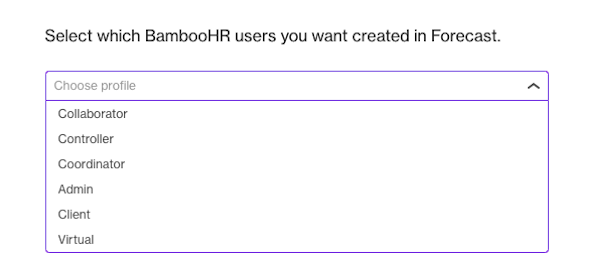
Image Select BambooHR user profile
You can now select the appropriate Forecast profile when importing new users via the BambooHR integration. This means the new users will no longer be added as Virtual users that need to be manually updated. You’ll also be able to import new people without needing to have available virtual seats on your plan.
2023-02-15 00:00:00
Anders Dehn
feature New Feature
by  Anders Dehn
Capacity Planning is here!
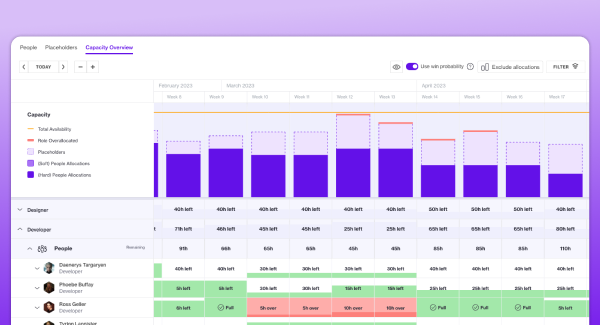
Wide image of Capacity Planning
With Capacity Planning, you can stay ahead of resource demands for your project pipeline and gain confidence in what projects you can take on.

From today, Plus customers operating with project allocations can:
  • Easily see their team’s overall state of capacity in one place
  • Eliminate manual work by consolidating tools and data into one easy-to-use system
  • Set their teams up for success by knowing what they can actually deliver and when
  • Give their team predictability in their workload and save headcount costs by only hiring when they need to

Capacity Planning has been added to the Plus tier at no additional cost and is available for customers using project allocations. 

Pro customers using project allocations can also use Soft Allocations to request team members for their project allocations or tentatively book them in.
2023-02-14 00:00:00
calen cole
whats-new-performance-improvement-rocket New Feature
by  Calen Cole
More precise currency conversions
Customers can now enter currency conversion rates to 4 decimal points rather than 2. So when converting Indian Rupees to Dollars, for example, you’ll get INR = .012 USD instead of the rounded-down INR = .01 USD
2023-01-29 00:00:00
Dylan Connerton
acadmey-icon Webinar
by  Dylan Connerton
Latest & Greatest Webinar
Latest and Greatest Q1 2023
Join Forecast product experts for a live demo of what's new in the platform. Lars Stevens, Operations Lead at the Red Cross, will join us to discuss how the Red Cross will be using one of our Latest & Greatest solutions, Capacity Planning.

We’ll also take you through the New Navigation and cover how we’re improving search, fixing paid time off and merging task assignments with project allocations.
Anders Dehn
whats-new-performance-improvement-rocket Product Update
by  Anders Dehn
Consistent timelines across your company
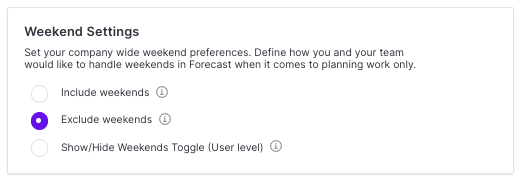
Image Weekend Settings
Historically, all team members could click the eye icon to hide weekends from timelines. This meant they wouldn’t be able to see tasks placed on a weekend and the time estimation for tasks spanning across weekends would appear shorter.

To ensure consistency for all team members, admins can now decide whether to include or exclude weekends on a company level. Head to your admin settings to choose.
2023-01-24 00:00:00
Anders Dehn
whats-new-performance-improvement-rocket Product Update
by  Anders Dehn
Keep track of availability when scoping projects
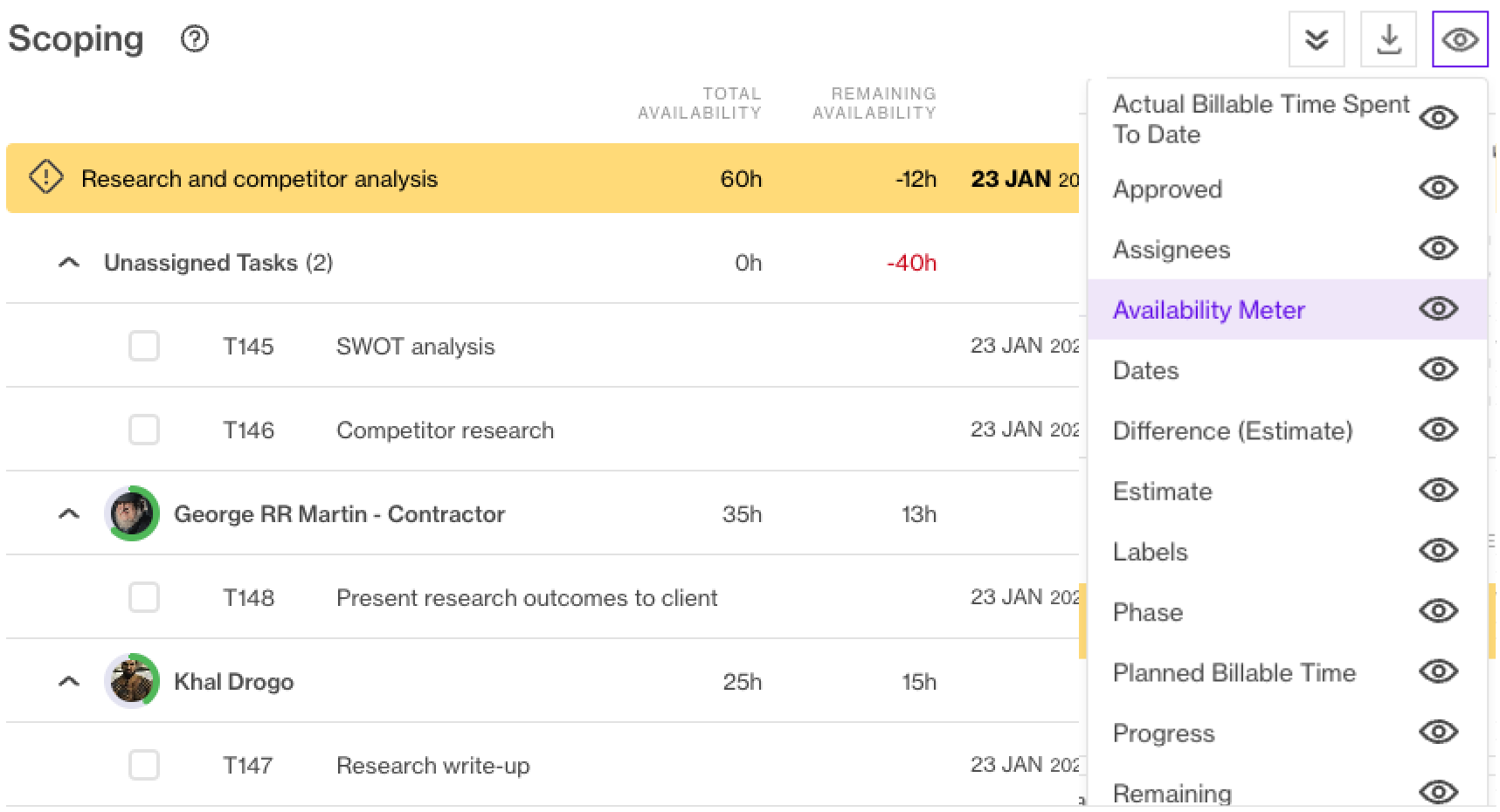
Availabiliy Meter on Scoping Page-1

Customers using project allocations can now keep track of the team’s remaining availability when assigning tasks on the Scoping page. 

Click the eye icon to add total availability, remaining availability, and the availability meter to your scoping page. When grouping the report by roles or people, the availability meter provides a visual representation of the remaining availability.

2023-01-24 00:00:00
Anders Dehn
whats-new-performance-improvement-rocket Product Update
by  Anders Dehn
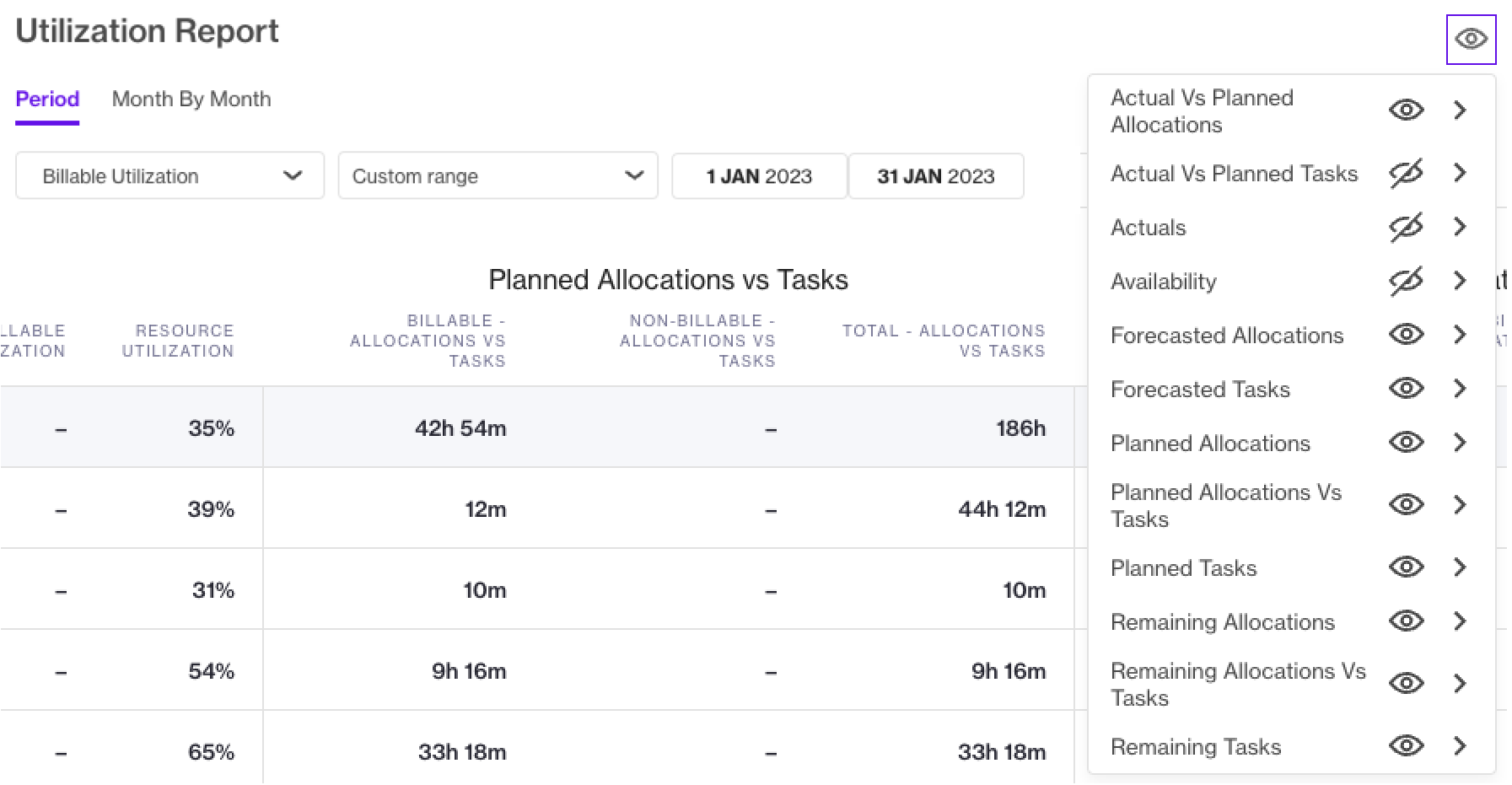
Report on both project allocations and task estimates simultaneously
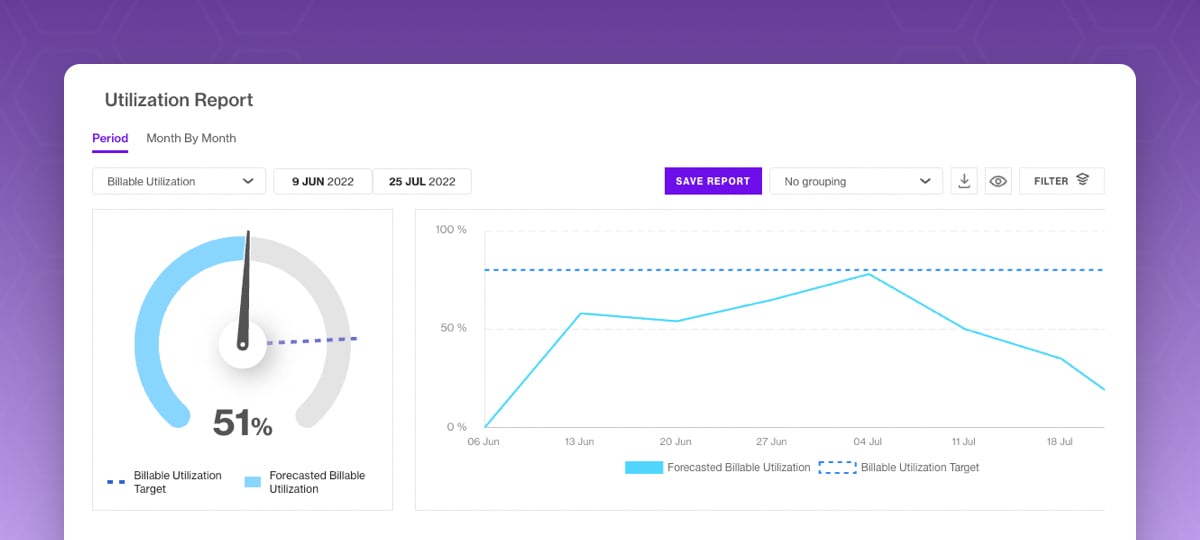
Image Utilization report showing project allocations and task estimates
See both task estimates and allocation numbers in the Utilization report at the same time. This enables you to create reports that compare e.g. planned allocated time vs. planned task assignments. 

This feature is available for customers using project allocations. Toggle on the new columns in your report using the eye icon.
2023-01-24 00:00:00
calen cole
whats-new-performance-improvement-rocket Product Update
by  Calen Cole
Make bulk changes to retainer periods

Image Bulk edit retainer periods
Use bulk actions to adjust the target or fixed price for multiple periods with just a few clicks. You can also lock or unlock periods, download time reported or delete periods.
2023-01-06 00:00:00
calen cole
feature New Feature
by  Calen Cole
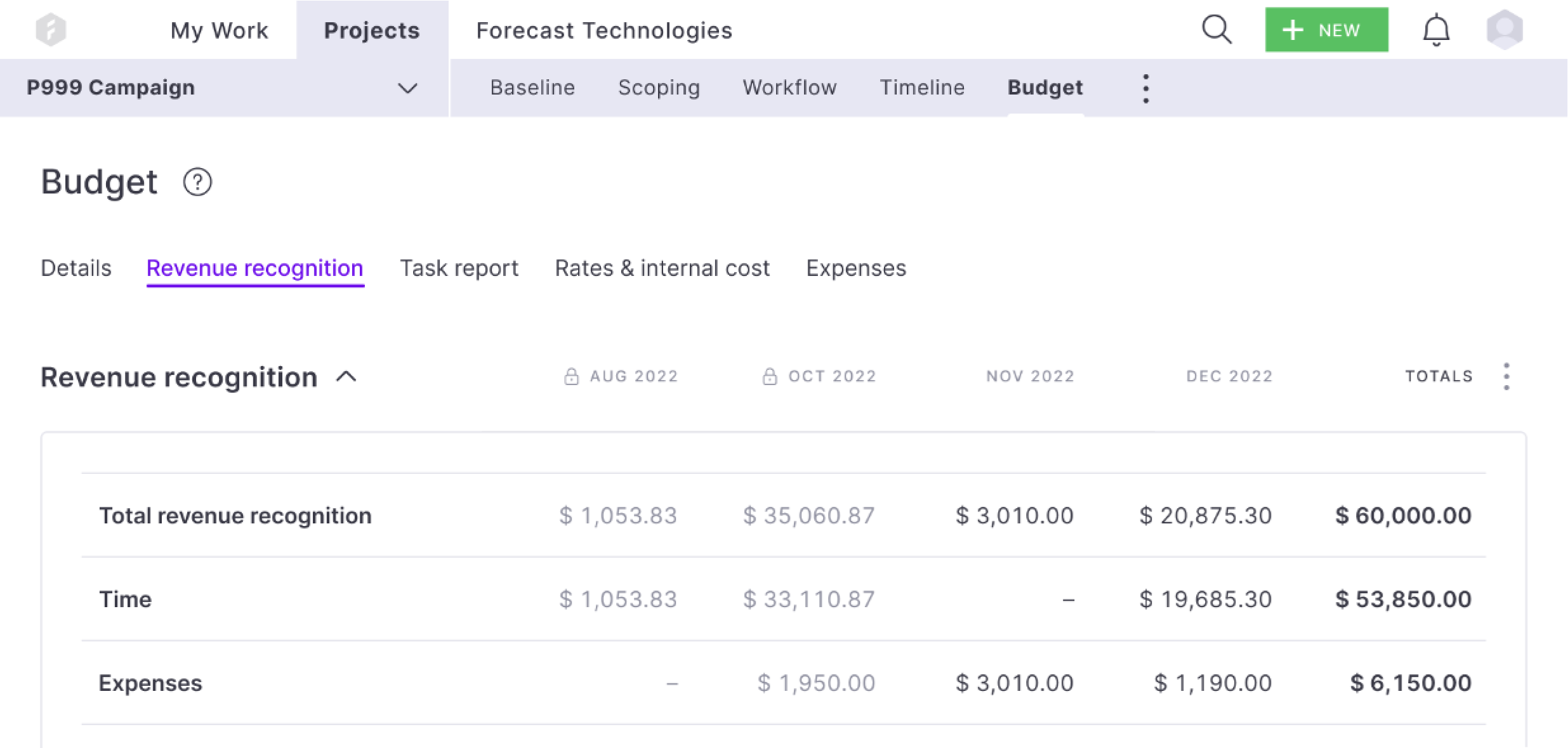
Revenue Recognition on all budget types
Revenue Recognition Images

Pro and Plus customers can now use Revenue Recognition to see an accurate monthly revenue distribution across all budget types and on a portfolio-level overview. Budget types include Time & Materials, Fixed Price and Retainers with fixed hours or price. You can also utilize the actual and forecasted revenue recognition numbers in your custom Advanced Analytics (AvA) reporting.

Each month can be locked in as revenue is reconciled in accounting records. Forecast will provide suggested amounts for revenue recognition, and you can overwrite the numbers if needed.

2022-11-03 00:00:00
niels
whats-new-performance-improvement-rocket Product Update
by  Niels Friedriksen
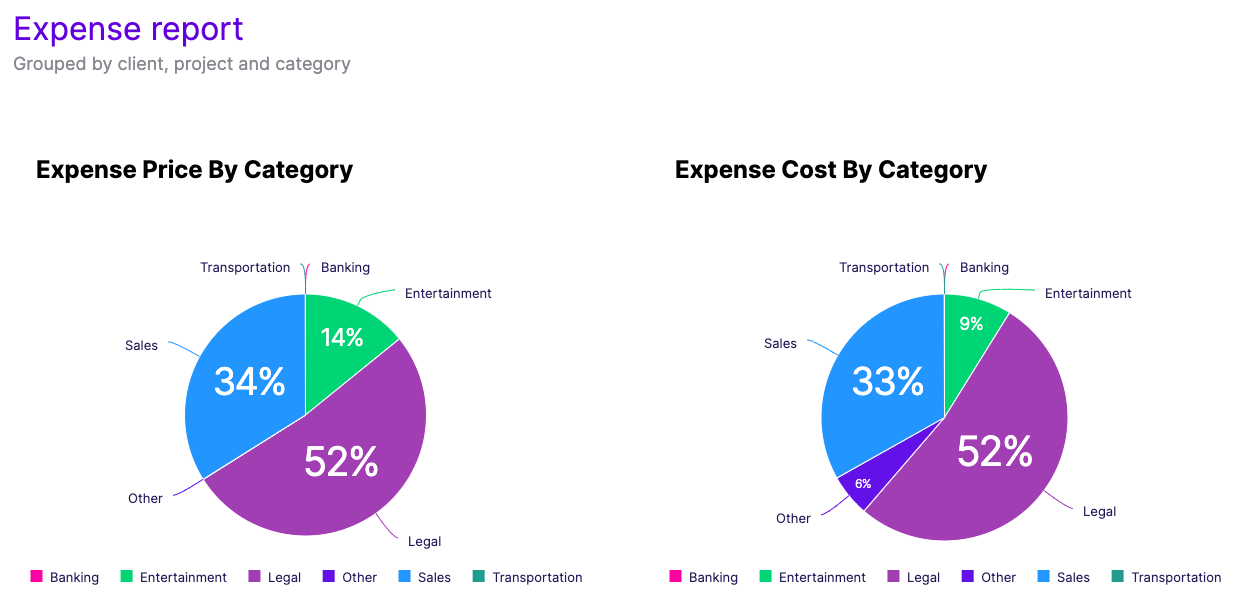
AvA Expense Template
Screenshot 2022-11-09 at 15.03.06

Improve your margins with custom expense reporting. Use the new Advanced Analytics (AvA) Expense Template to get started and adapt it to your company’s needs. By looking at the template groupings, you can quickly identify what clients, projects and categories are your main cost and revenue drivers.

2022-10-27 00:00:00
dainius
feature New Feature
by  Dainius Kniuksta
Get early access to new functionalities

The Forecast platform is being continuously improved to best fit our customers’ needs. To make sure we’re adding value, we use a combination of feedback loops, including the Beta program.


By signing your company up for the Beta program, you can get early access to new functionalities and help shape them. When testing smaller features, you'll be given direct access to test and provide feedback. Our research teams will walk you through larger functionality, such as Capacity Planning or Program Management, to ensure smooth onboarding and direct feedback loops.


Signing up is easy! Head to your Company settings under the Admin panel to join by accepting the Forecast Beta Program terms and conditions.

2022-10-17 00:00:00
dainius
whats-new-performance-improvement-rocket Product Update
by  Dainius Kniuksta
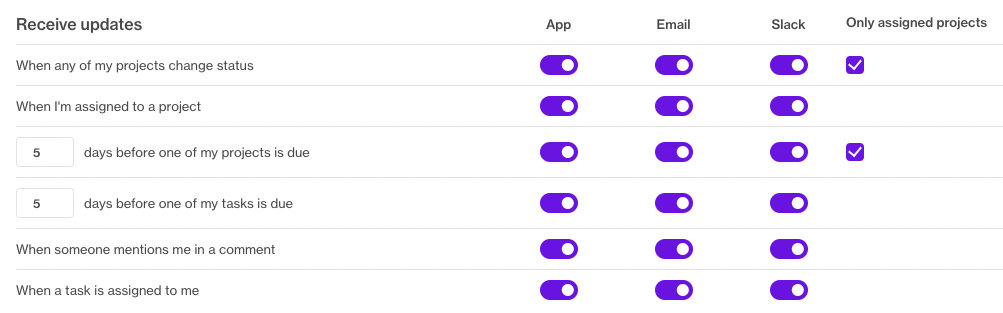
Get relevant notifications by filtering out the noise
Screenshot 2022-10-18 at 14.15.48
If you have access to view all projects you’ll automatically get notified about them all by default. This can become a bit overwhelming. With the updated settings, you can limit your notifications to projects you are assigned to. You can also decide what channels you’ll be notified on and how often.
2022-10-04 23:00:00
Anders Dehn
whats-new-performance-improvement-rocket Product Update
by  Anders Dehn
Update your Utilization report with a single click
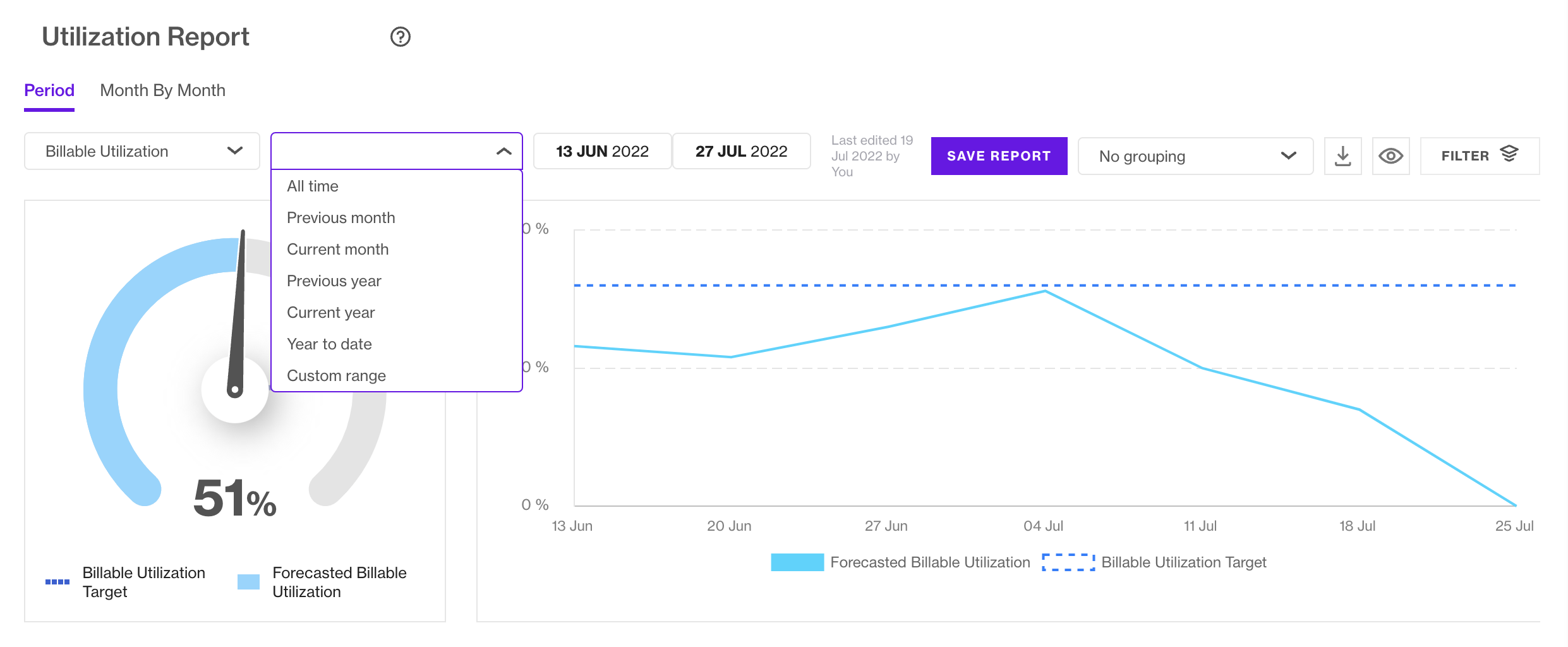
Screenshot 2022-10-04 at 11.14.24
When creating and updating your Utilization reports you can now select common date ranges like 'Previous month', 'Current month', 'Year to date' with a single click. Learn how efficiently your resources have been utilized throughout projects and compare them by selecting ‘All Time’.
2022-09-27 23:00:00
calen cole
whats-new-performance-improvement-rocket Product Update
by  Calen Cole
Get your connected projects’ finances 4x faster!
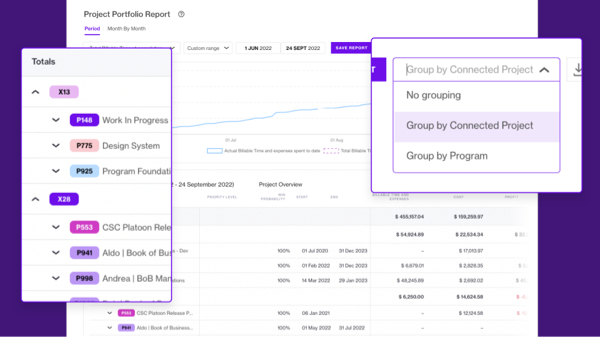
Connect by Project email 600px

It’s time to leave the old Project Portfolio Report (PPR) behind. Get the full overview of your project finances, including connected projects, with the 4x faster standard report.  


Group the updated PPR by connected projects to compare the financial roll-up of your connected projects to each other, and other projects in your company. The report also includes date range selections and a graph to display your financial data.

2022-10-23 23:00:00
niels
whats-new-performance-improvement-rocket Product Update
by  Niels Fredriksen
You can now do expense reporting with Advanced Analytics (AvA)

Get an overview of all your projects' expenses and identify what categories are your main cost and revenue drivers. With AvA, you can create custom reporting using new data fields showing billable vs non-billable expenses to optimize pricing and increase your profits. 

The newly added expense fields are: 

  • Expense Name
  • Billable
  • Approved
  • Unit Cost
  • Unit Price
  • Quantity
  • Markup Percentage
2022-09-19 23:00:00
Anders Dehn
whats-new-performance-improvement-rocket Product Update
by  Anders Dehn
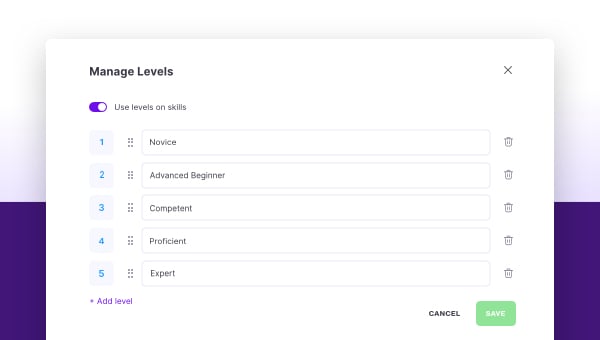
Improve capacity planning precision with the ‘Skill Levels’ feature
Manage Skill Levels-2
Finding the right person for a job is crucial for resource planning. It's not just a matter of skills, but also level of expertise.

Make resource planning easy with a centralized overview of your team’s capabilities. It’s as simple as adding your company’s skill levels into the Forecast app.
2022-08-31 23:00:00
niels
whats-new-performance-improvement-rocket Product Update
by  Niels Fredriksen
8 new AvA templates you’ll recognise
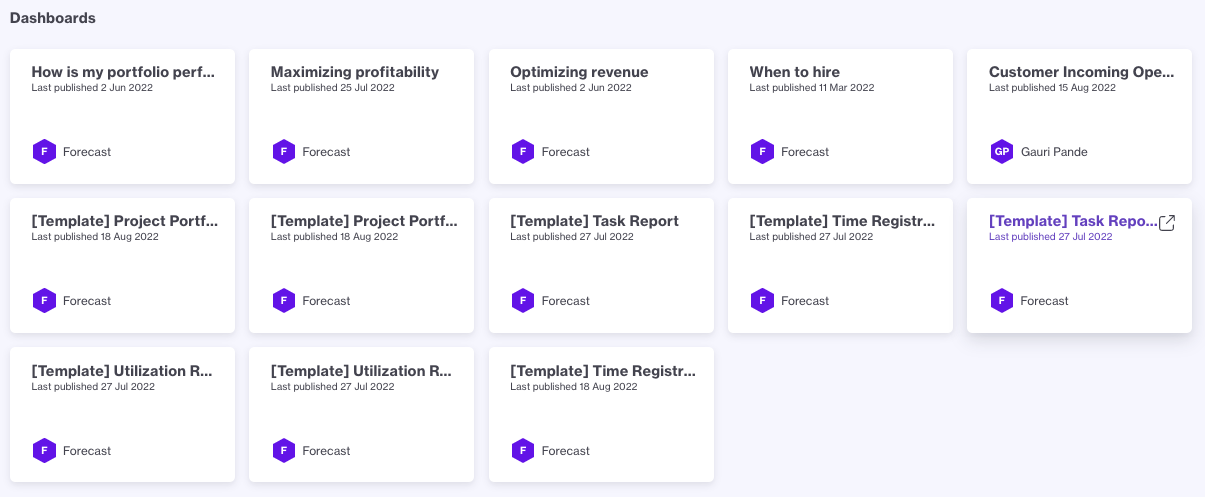
New AvA Templates

The new templates mimic the familiar Forecast Standard reports so you can get started effortlessly. Open a template, duplicate it, modify the existing data and add graphs to fit your specific needs. 

The Forecast Templates come in 2 variations and are available through the “Forecast Templates” library.

  • Time 
  • Task 
  • Utilization 
  • Project Portfolio
2022-08-17 23:00:00
Anders
whats-new-integration-lightning New Feature
by  Anders Mortensen
How Standard reports are outperforming Component reports
Utilization Report Graphics

In contrast with Component reports, Standard reports can be created with a single click, meaning they load faster than ever before.

Each one has been built based on our customers’ core reporting needs. The Time Registered Report and Task Report have also been equipped with a safer sharing  mechanism

Standard reports

  • Project Portfolio Report
  • Utilization Report
  • Time Registered Report
  • Task Report
2022-08-09 23:00:00
niels
whats-new-performance-improvement-rocket Product Update
by  Niels Frederiksen
Create custom tasks reports with AvA

Create task reports in AvA by using newly added task fields. With the expanded data model, you now can break down project revenue, project time and time registration by tasks. 

The new fields are:

Task details

  • Task ID and name
  • Task assigned role
  • Task assignees showing as a string of text with assignees
  • Task label(s)

Task status indicators

  • Bug, Blocked, Approved and High priority as ‘Yes’/’No’ options

Task dates

  • Task start date and deadline
  • Task creation date

Task in sprints and workflows

  • Name of the sprint the task belongs to
  • Sprint start and end dates
  • Workflow column name as a text field
  • Workflow status category of the task. Options: ‘to-do’, ‘in progress’ and ‘done’
2022-07-26 23:00:00
calen cole
whats-new-performance-improvement-rocket Product Update
by  Calen Cole
Get financial totals with a single selection
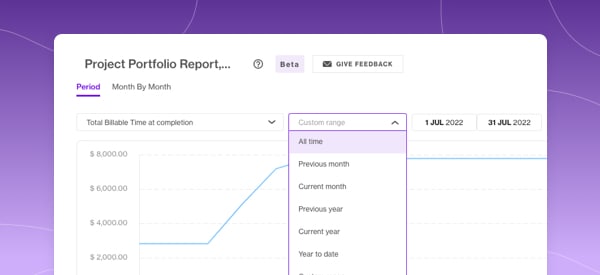
Project-portfolio-2

See your projects' total in your Project Portfolio Report by selecting 'All Time' in the new date picker.

You can also select common date ranges like 'Previous month', 'Current month', 'Year to date' in a flash.

2022-08-22 23:00:00
calen cole
whats-new-performance-improvement-rocket Product Update
by  Calen Cole
Month By Month broken down into Time, Expenses and Total
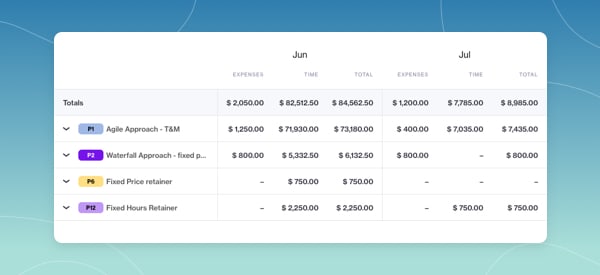
month-by-month

Get more details from the Month by Month overview of your Project Portfolio Report. You can now see your financial figures broken down into Time, Expenses and Total.

The columns can be toggled on or off by clicking the Eye icon. You'll find the icon next to the download as CSV button. 

2022-08-22 23:00:00
Amy
feature New Feature
by  Amy Spagnolo
Advanced Analytics (AvA) Report Recipes

Creating new dashboards just got easier with AvA recipes. You can follow them to a T or tweak as you see fit.

Recipes

  • Average minutes registered by Project
  • Reporting on project actual revenue by client
  • Total minutes registered by person
  • Reporting on total minutes registered by project name
  • Reporting on project stages and their status
2022-07-21 23:00:00
dainius
whats-new-integration-lightning New Feature
by  Dainius Kniuksta
Identify and take action on project risks by leveraging AI
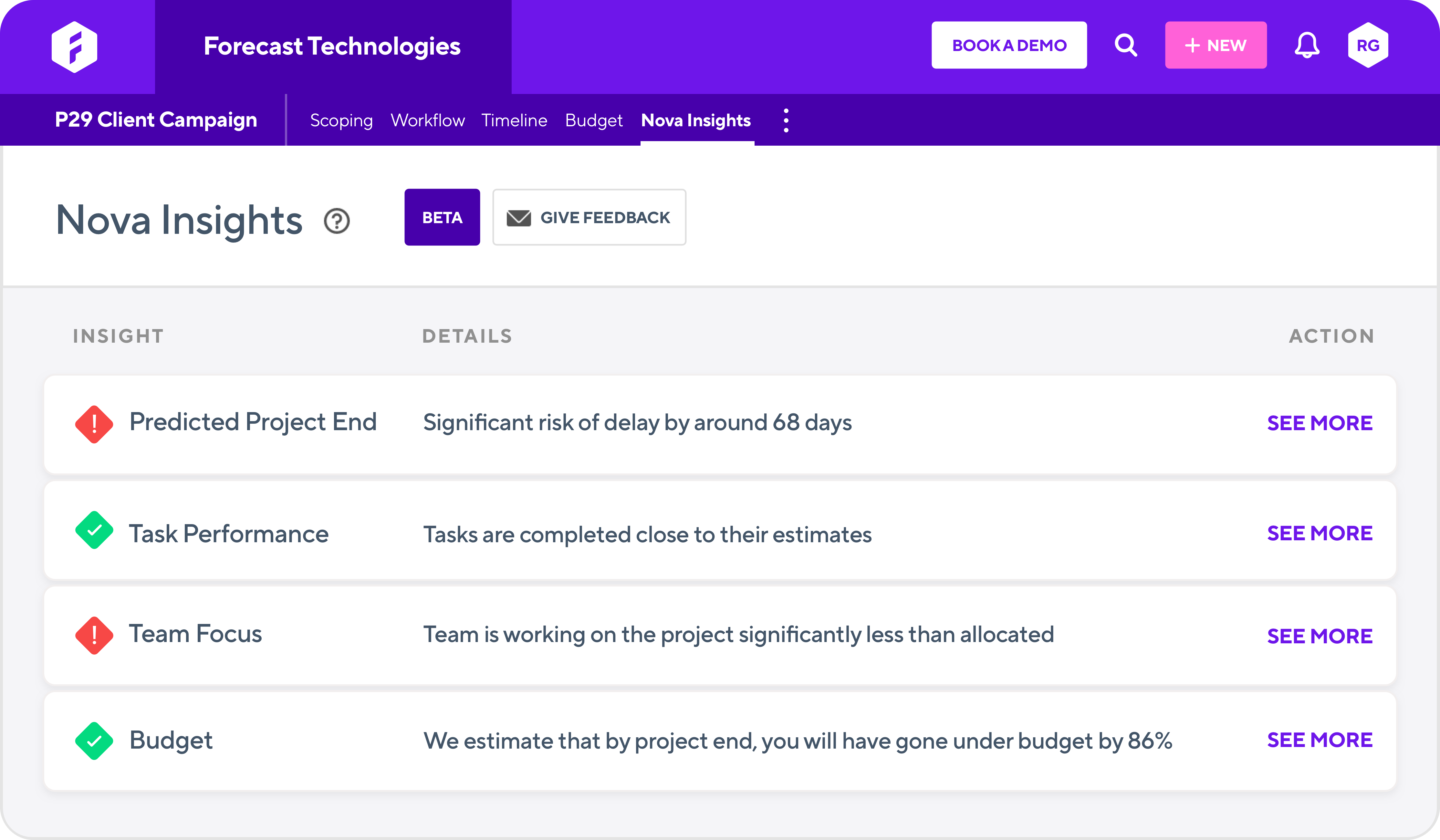
Nova insights flat

Nova Insights is your AI partner to get a quick, easy and understandable overview of how your projects are going. You can review your project's predicted end date, task performance, budget and team focus in one single overview.  

Using a traffic light system, you can immediately check on each part of your project and dig deeper into where you need to take action.

2022-07-12 23:00:00